Description
Flipping a house is a numbers business — and most flips that lose money were lost on paper before the first wall came down. This system runs the whole deal in one workbook: the offer math up front, the rehab budget and bids while you work, the holding costs that quietly eat profit, and the final bottom line when you sell.
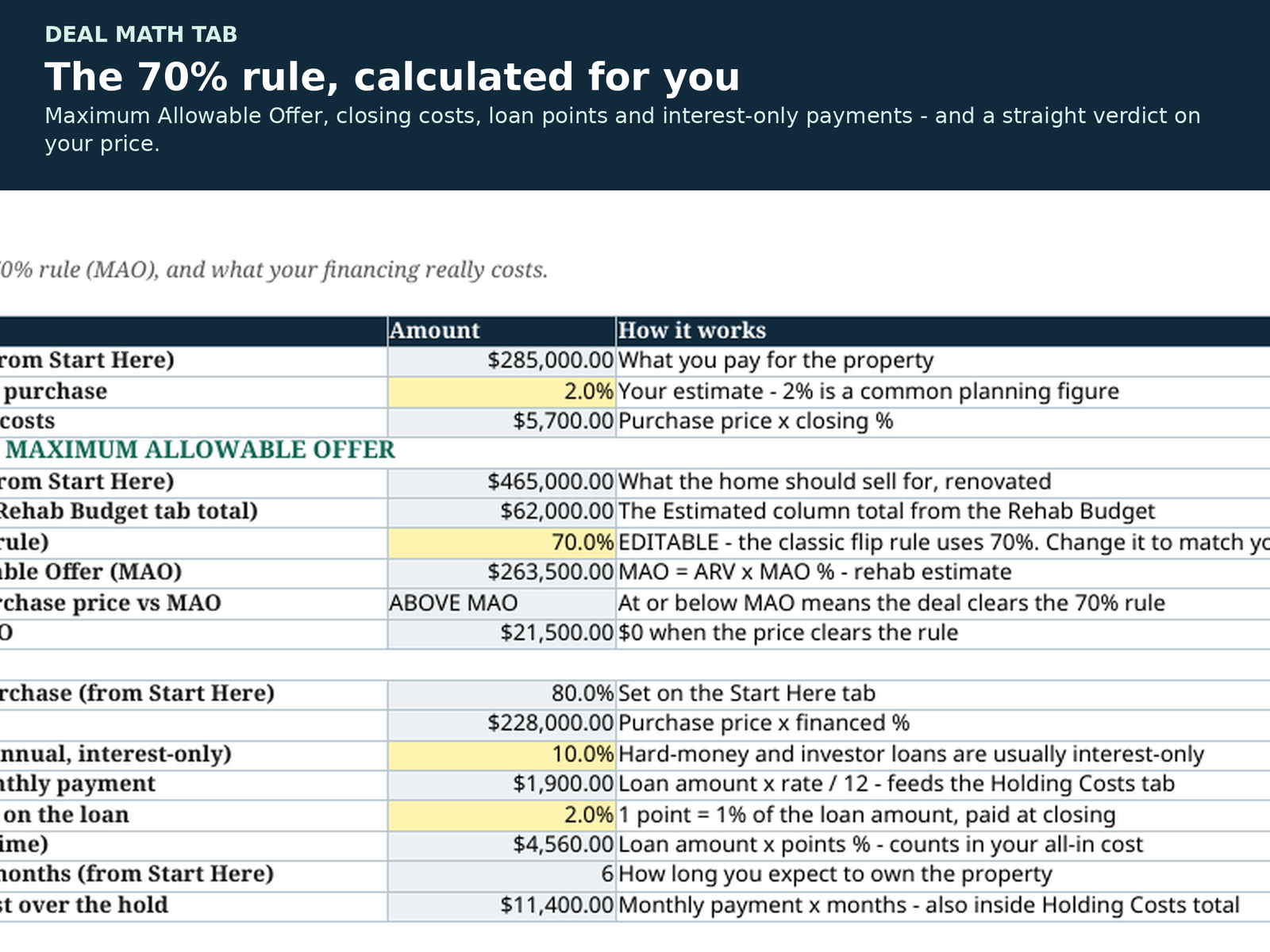
It starts with Deal Math: your Maximum Allowable Offer from the 70% rule (the MAO % is an editable yellow cell — set it to your market), purchase closing costs, and your financing laid out honestly — loan amount, interest-only monthly payment, points, and total interest over the hold. Then the flagship-grade rehab system takes over: budget vs actual, contractor bid comparison, change orders that only count when Approved, and a payments tracker. Holding Costs multiplies your monthly carrying costs by your months held, and Sale & Profit lands the plane: net proceeds, all-in cost, FINAL net profit, ROI on the cash you actually put in, annualized ROI, and your break-even sale price.
The 9 tabs:
• Start Here — property address, purchase price, ARV, contingency %, holding period and financing %. Everything reads from here.
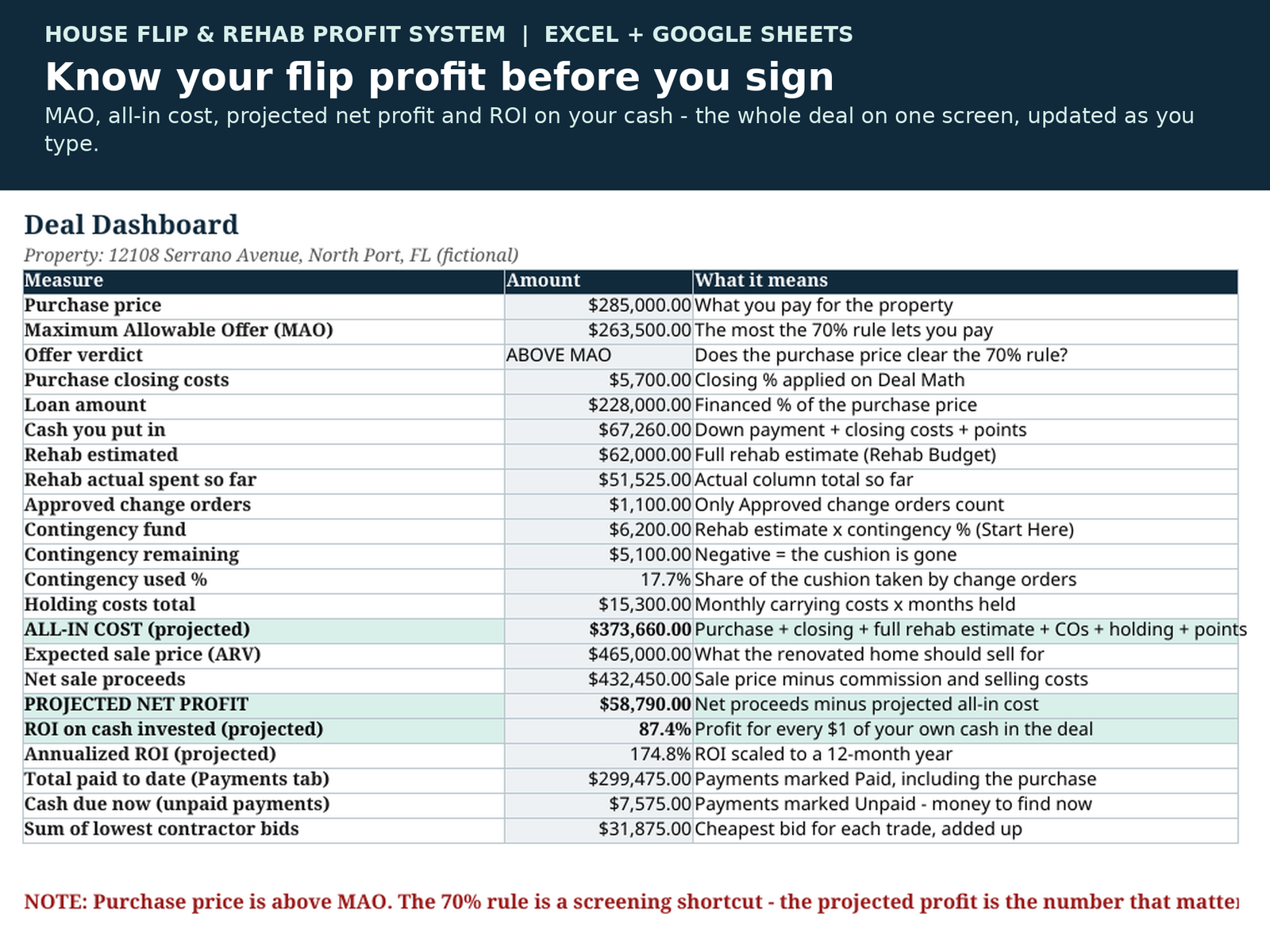
• Dashboard — the whole deal on one screen: MAO verdict, cash in, rehab vs budget, contingency left, holding costs, projected profit and ROI, plus red alerts if the profit goes negative.
• Deal Math — closing costs, the 70% rule (MAO = ARV × MAO % − rehab), and financing: loan, interest-only payment, points, total interest.
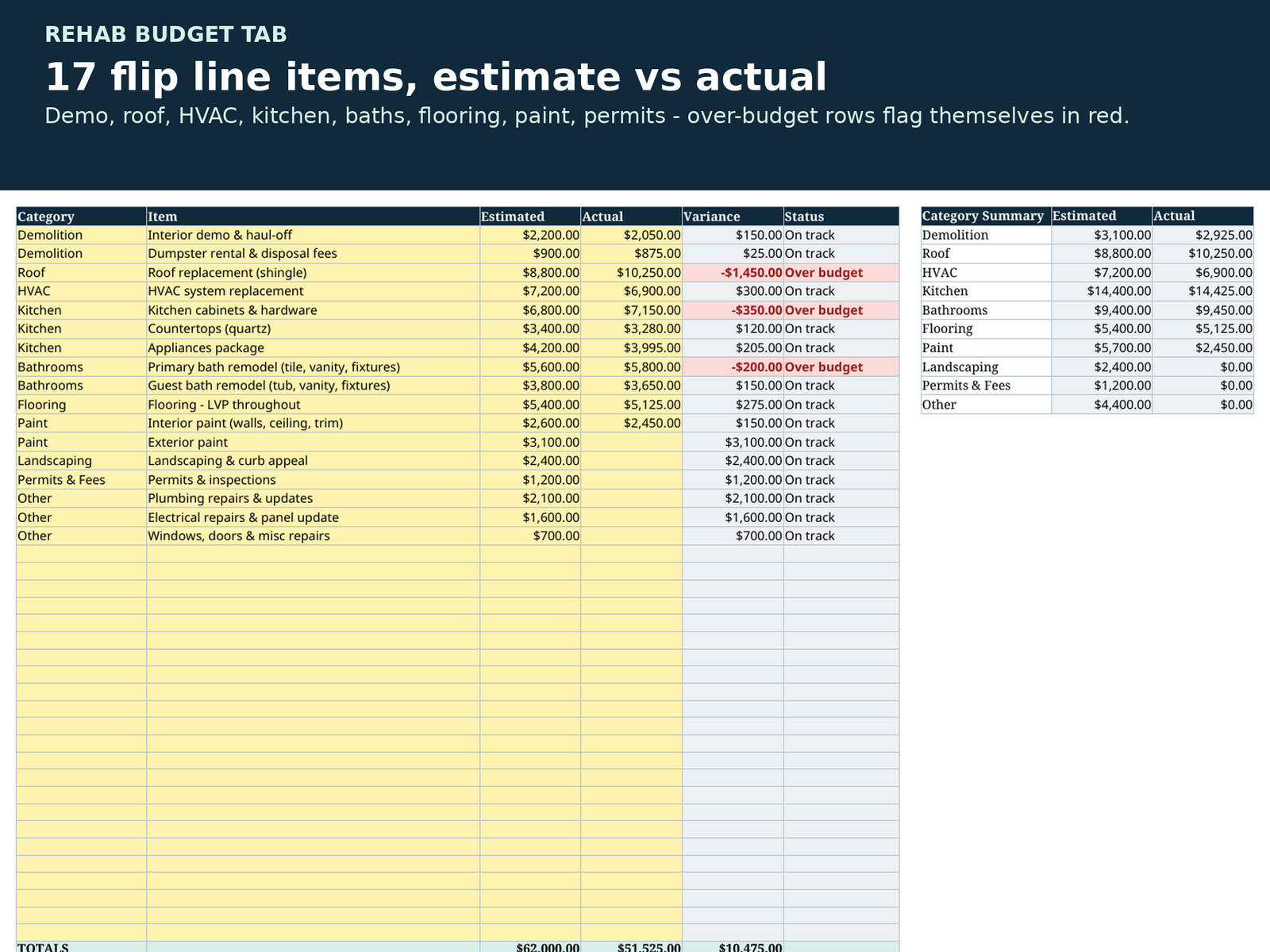
• Rehab Budget — 17 standard flip line items pre-filled (demo, roof, HVAC, kitchen, baths, flooring, paint, landscaping, permits), estimated vs actual with automatic Over budget flags.
• Contractor Bids — up to 3 bids per trade; the lowest bid for each trade is flagged and totalled automatically.
• Change Orders — only Approved change orders count toward your costs, and they draw on your contingency fund.
• Payments — Paid / Unpaid / Scheduled for every dollar out, including the purchase itself.
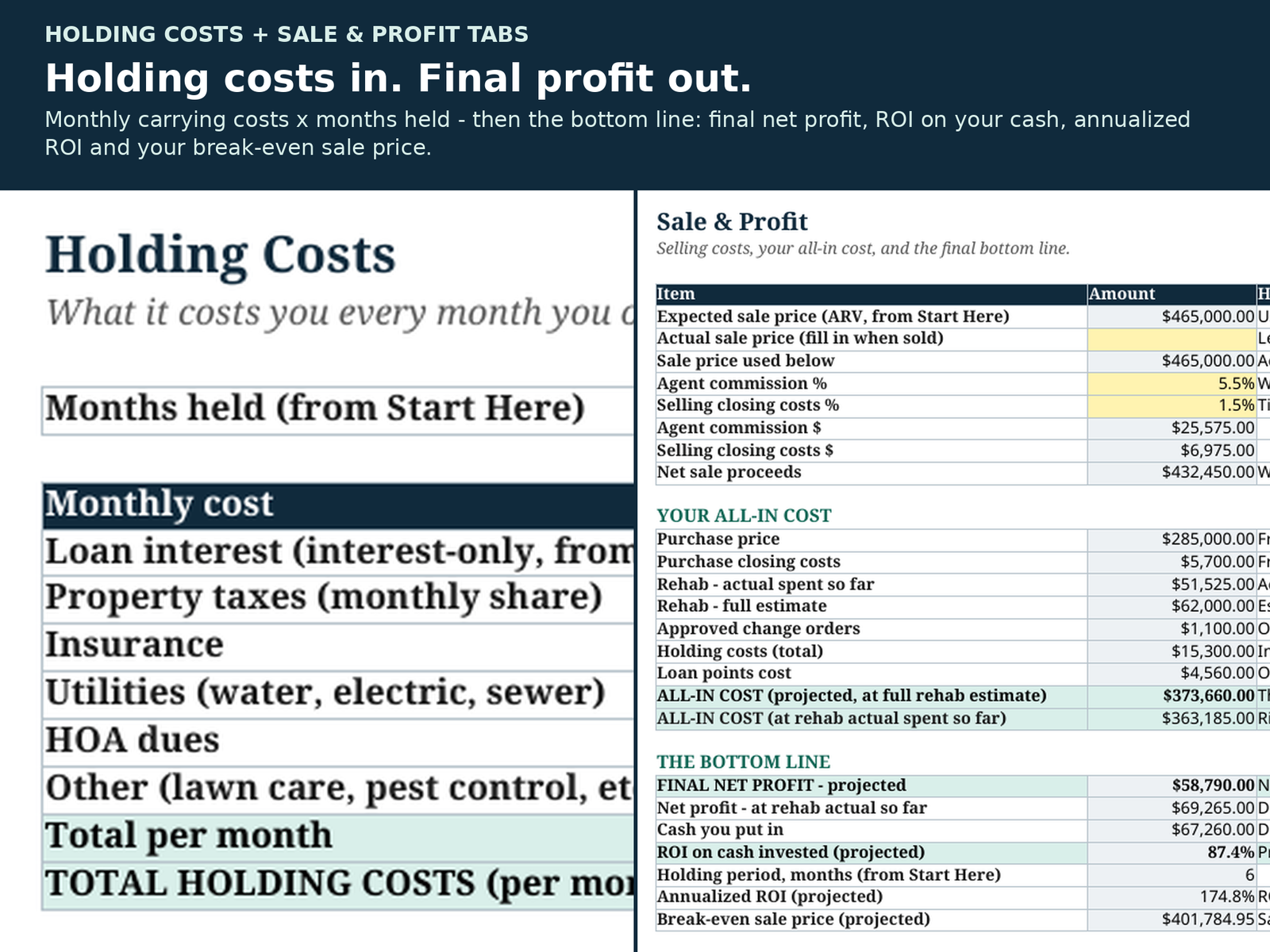
• Holding Costs — taxes, insurance, utilities, HOA and loan interest, per month × months held.
• Sale & Profit — selling costs, all-in cost two ways (projected at full rehab estimate, and at actuals so far), final net profit, ROI on cash invested, annualized ROI, break-even sale price.
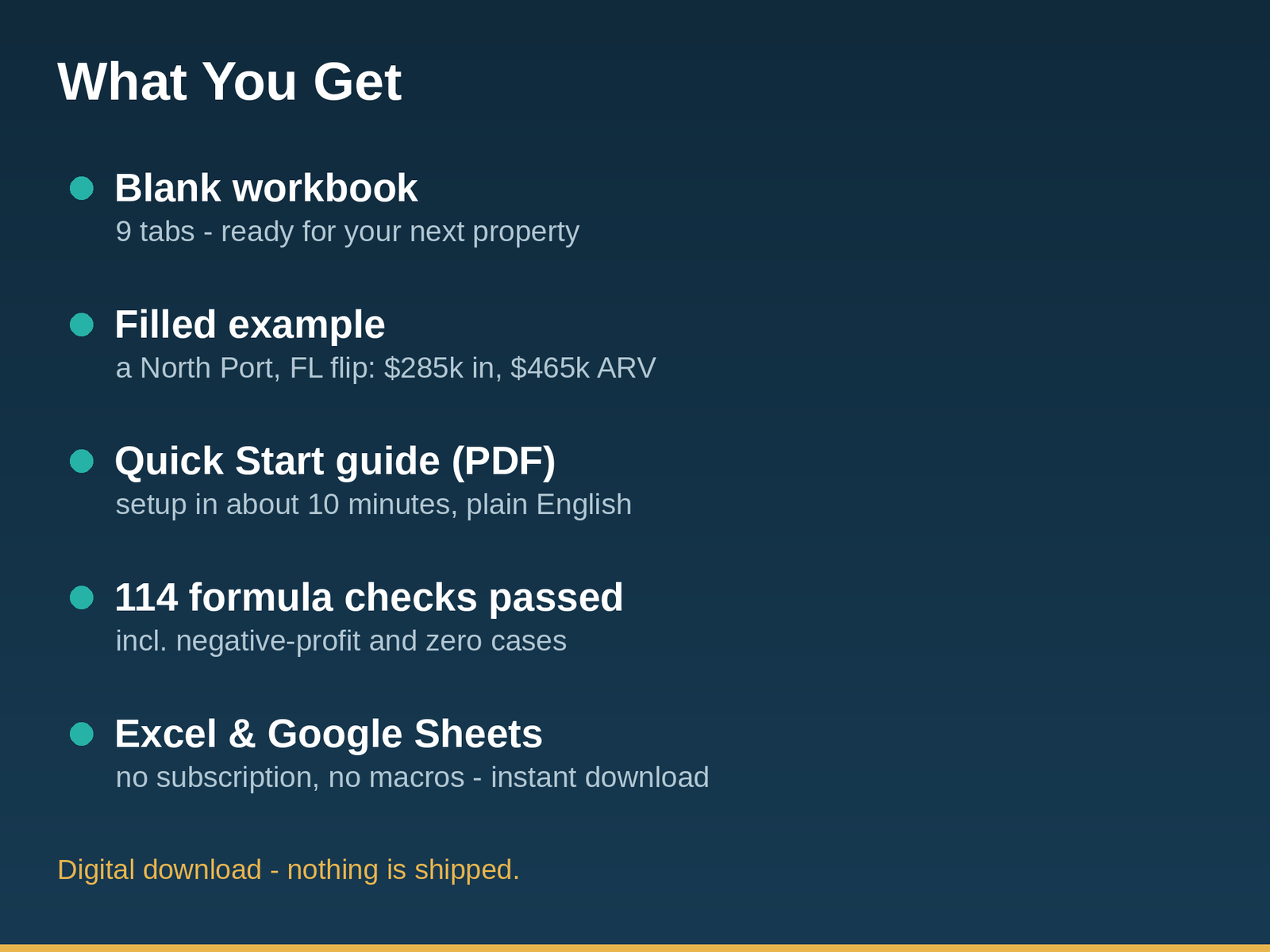
The example is a real-shaped deal, not a fantasy. The filled example is a fictional North Port, Florida flip — bought at $285,000 with a $62,000 rehab estimate against a $465,000 ARV over a 6-month hold. It prices above its $263,500 MAO, and the workbook says so in plain text — because in today’s Florida market the strict 70% rule screens out almost everything. The system teaches you to screen with MAO, then judge on projected profit and ROI: this one projects $58,790 profit on $67,260 of cash in. Every number in the example is hand-verifiable.
Honest positioning — which RemodelLedger system do you need?
• Screening deals you haven’t bought yet? Start with the Deal Analyzer ($19.99) — three deals side by side in minutes. This system is for the deal you bought.
• Bought the house? This is your tracker from closing day to sale day.
• Renovating your own home, not flipping? The Home Renovation Planner System ($34.99) is the homeowner sibling — same budget, bids, change orders and payments, without the investor math.
• Want both investor tools? The Investor Bundle ($44.99) includes this system and the Deal Analyzer — save $4.99 vs buying both.
You receive 3 files:
1. The system, BLANK — flip line items pre-filled, money columns empty, ready for your property.
2. The system, EXAMPLE — the complete fictional North Port flip filled in mid-project, so you can see exactly how everything works.
3. A Quick Start Guide (PDF) — setup in about 10 minutes, every tab explained, and a walkthrough of the example deal.
Good to know:
• Works in Microsoft Excel and Google Sheets. Yellow cells are for typing, grey cells are formulas — that’s the only rule.
• No subscriptions, no macros, no add-ons. Buy once, reuse for every property.
• Instant download — files are available as soon as you check out.
• This is an educational bookkeeping and deal-tracking tool — not financial, investment or tax advice.
About how this was made: This spreadsheet was created with the help of AI tools, then independently formula-tested (114 automated checks recalculated and verified, including blank, zero-value, all-change-orders-rejected and negative-profit cases) and reviewed before listing — the same standard as every RemodelLedger product. The example numbers are fictional.



Reviews
There are no reviews yet.